5 Essential Enhancements in the Python VS Code November 2025 Release
The November 2025 release of the Python extension for Visual Studio Code brings a set of focused improvements that boost documentation workflows, clean up code, and streamline debugging across multiple projects. Whether you rely on AI‑powered summaries or need to refactor legacy imports, this update has something for you. Below we unpack the five key features you should know about.
- 1. Turn Copilot Summaries into Inline Docstrings
- 2. Localized Copilot Hover Summaries
- 3. Convert Wildcard Imports with a Single Click
- 4. Debugger Support for Multiple Interpreters via the Python Environments Extension
- 5. Other Notable Tweaks and Fixes
1. Turn Copilot Summaries into Inline Docstrings
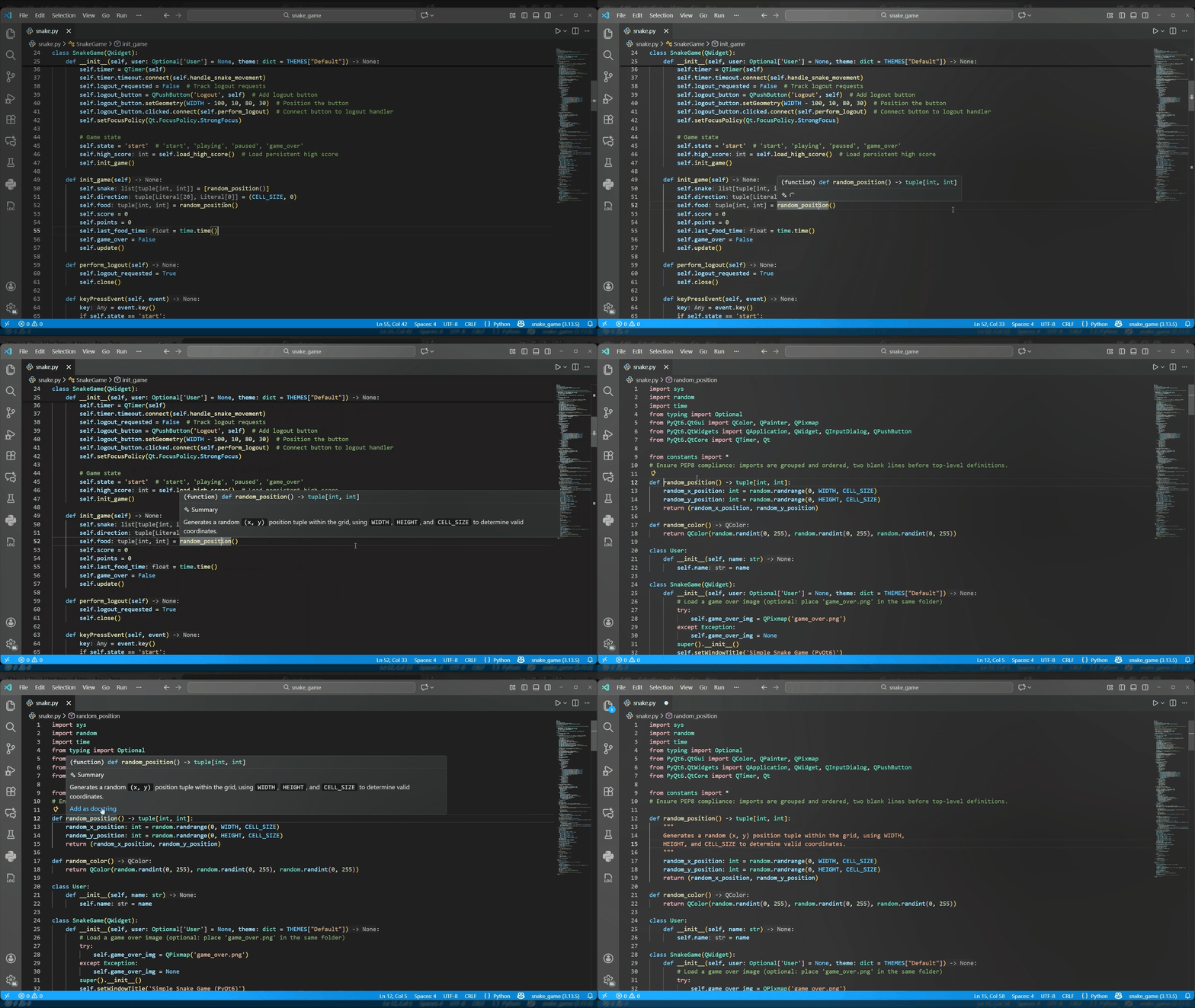
Documenting your code just became much smoother. With the new Add as docstring command, you can transform an AI‑generated hover summary directly into a proper docstring within your source file. After you invoke a Copilot summary for a function or class, simply navigate to the symbol definition and hover over it. A new command appears that inserts the summary at your cursor position, formatted as a standard docstring. This eliminates the need to manually copy and paste or retype, letting you keep your code readable and maintainable without extra effort.
2. Localized Copilot Hover Summaries
GitHub Copilot Hover Summaries in Pylance now respect your display language settings inside VS Code. When you request an AI‑generated summary, the explanation appears in the same language you use for your editor interface. This localization makes it easier to understand the generated documentation, especially for teams working in non‑English environments. The feature works automatically—just set your preferred language in VS Code and the summaries will follow suit.
3. Convert Wildcard Imports with a Single Click
Wildcard imports (from module import *) are often discouraged because they pollute the namespace and obscure where symbols come from, hurting code clarity and maintainability. Pylance now offers a Code Action that replaces a wildcard import with explicit references. When you click on the line containing the wildcard and press Ctrl+. (or Cmd+. on macOS), you can select Convert to explicit imports. The tool preserves any aliases and keeps the import as a single statement, making your code cleaner and easier to trace.

4. Debugger Support for Multiple Interpreters via the Python Environments Extension
If you work with multiple projects in a single workspace, each requiring a different Python interpreter, the debugger now handles that gracefully. By integrating with the Python Environments Extension, the debugger can recognize and use the interpreter assigned to each project folder. When you start a debugging session, it picks up the interpreter shown in the status bar for that project. To enable this, set "python.useEnvironmentsExtension": true in your user settings. This integration is only active when that setting is turned on, and any issues can be reported to the Python Debugger repository.
5. Other Notable Tweaks and Fixes
Beyond the headline features, the November release includes several smaller improvements and bug fixes based on user feedback. These address unexpected blocking issues during debugging and enhance overall reliability when working with Python in VS Code. For the complete list of changes, refer to the changelogs for the Python and Pylance extensions.
Stay tuned for more updates and happy coding!